Container Vulnerability Management
In this blog post I want to explain how I manage my containers and how I keep them up to date in my homelab, my cloud infrastructure and the other environments that I maintain.
This post builds on my move from GitLab to Forgejo, which I describe in a separate post. The short version: my repositories and my CI now run on infrastructure I host myself. That CI is where my container images are built, tested, scanned and pushed.
I need a system that is stable, that I can manage and that is secure. Some of my services are public-facing. Because of that, vulnerability management is very important for me and I need a way to react quickly.
Why I build my own images
I have different environments: Kubernetes environments, normal Debian or Red Hat servers, Raspberry Pis and other homelab systems. I need a way to deploy applications and run them on all these environments without having too much work every time.
Using images from docker registries like hub.docker.com published by an application vendor or a private person is convenient but it doesn't always give me enough control. Maybe the image is not maintained well and it contains old packages and dependencies that are vulnerable. If an attacker can exploit a vulnerability in a container and get RCE (Remote Code Execution), they could compromise it and get access to the server itself.
That's why I need reproducible images and most importantly a way to roll out updates fast and easy. Building my own images lets me set my own standards and I know exactly what and why something is installed and avoid installing packages that the runtime application doesn't need.
My container architecture
Most of the images I need every day are built by me. The image building chain currently looks like this:
flowchart LR
    Snapshot["Debian snapshot"] --> Debian["Debian base image"]
    Debian --> PHP["PHP base image"]
    PHP --> App["Application image\n(for example Nextcloud)"]
    App --> Harbor["Harbor registry"]
    Harbor --> Kubernetes["Kubernetes / other hosts"]
From the base image to the application is everything built by me.
Starting with the base debian image: I use snapshot.debian.org to get the latest snapshot of debian and create based on this snapshot an OCI container image. This container image is then used to build further images, for example my PHP base image. An application image like Nextcloud uses this PHP base image for its runtime.
All those images are published in my internal Harbor registry which my servers are pulling from, like my Kubernetes cluster. Harbor is an open-source container registry and a CNCF graduated project. Besides storing images, it adds access control, vulnerability scanning and SBOM support.
Another important aspect of my container build process is: I need both ARM and AMD64. For my homelab I mostly use Raspberry Pi's which run ARM while other parts like notebooks or most of my servers use AMD64.
Classifying components by exposure
Most services are separated into multiple microservices: Nextcloud has the Nextcloud frontend, a database, a cache database, some image preview generation containers and many more. This means not all critical vulnerabilities have the same risks: a Nextcloud frontend vuln is much riskier than an image preview generation container that is not directly exposed to the internet. All the components are classified by how an attacker could reach them:
| Class | Exposure | Examples | Reaction |
|---|---|---|---|
| 1 | Reachable from the internet or the user base | Frontend, reverse proxy, public API | Immediately, restrict access until patched |
| 2 | Internal component of a public service | Backend, database, queue | As soon as possible |
| 3 | Isolated homelab service | Internal tools, test systems | With the next regular rebuild |
Building and updating the images
All my container repositories are on my Forgejo instance. For CI/CD I use Forgejo Actions to build, test and push those containers to Harbor. I wrote reusable Forgejo Actions for this, which are the equivalent of GitLab Components. That way I can reuse a Forgejo Actions configuration across projects.
The simple abstraction of Forgejo Actions workflow looks like this:
flowchart LR
    Checkout["Checkout repository"] --> Build["Build image"]
    Build --> Test["Run tests"]
    Test --> Scan["Scan with Trivy"]
    Scan -->|No relevant findings| Push["Push to Harbor"]
    Scan -->|Finding needs review| Stop["Stop pipeline"]
All the OCI images depend on each other. All images are defined using a Containerfile, where I only reference and use the SHA digest and not only an image tag. With this digest I can verify that the image in Harbor is the image that I expect.
When I update the Debian base image, its digest changes. Renovate detects this change and opens a PR in the PHP repository. The PHP image is then built again and gets a new digest. After that, Renovate detects the new digest in the Nextcloud repository and opens another PR there. Once this is merged, the Nextcloud image is built, tested, scanned and pushed to Harbor.
The dependency chain can also be shown like this:
flowchart TD
    DebianUpdate["Debian base image updated"] --> PHPPR["Renovate opens PHP pull request"]
    PHPPR --> PHPBuild["Build and scan PHP image"]
    PHPBuild --> AppPR["Renovate opens application pull request"]
    AppPR --> AppBuild["Build and scan application image"]
    AppBuild --> Registry["Push image to Harbor"]
    Registry --> FluxPR["Update Flux repository"]
    FluxPR --> Deployment["Deploy to Kubernetes"]
Harbor, SBOMs and vulnerability scanning
Besides git hosting, GitLab also provided me with a container registry. After moving to Forgejo I wanted a dedicated registry, and Harbor is the one I picked. It provides much more than just an image registry: projects, access control, retention policies, replication, vulnerability scanning and SBOM support.
Setup
Harbor runs in my k3s cluster. It is deployed with the official Helm chart and managed by Flux, like my other applications. Users log in with Authentik through OIDC, so I do not need a separate set of credentials for Harbor.
Projects
To keep things organised, I use separate Harbor projects for different types of containers:
base: my own base imagesctr: application and CI images built on top of the base images
The third project, library, is the default Harbor project and remains empty.
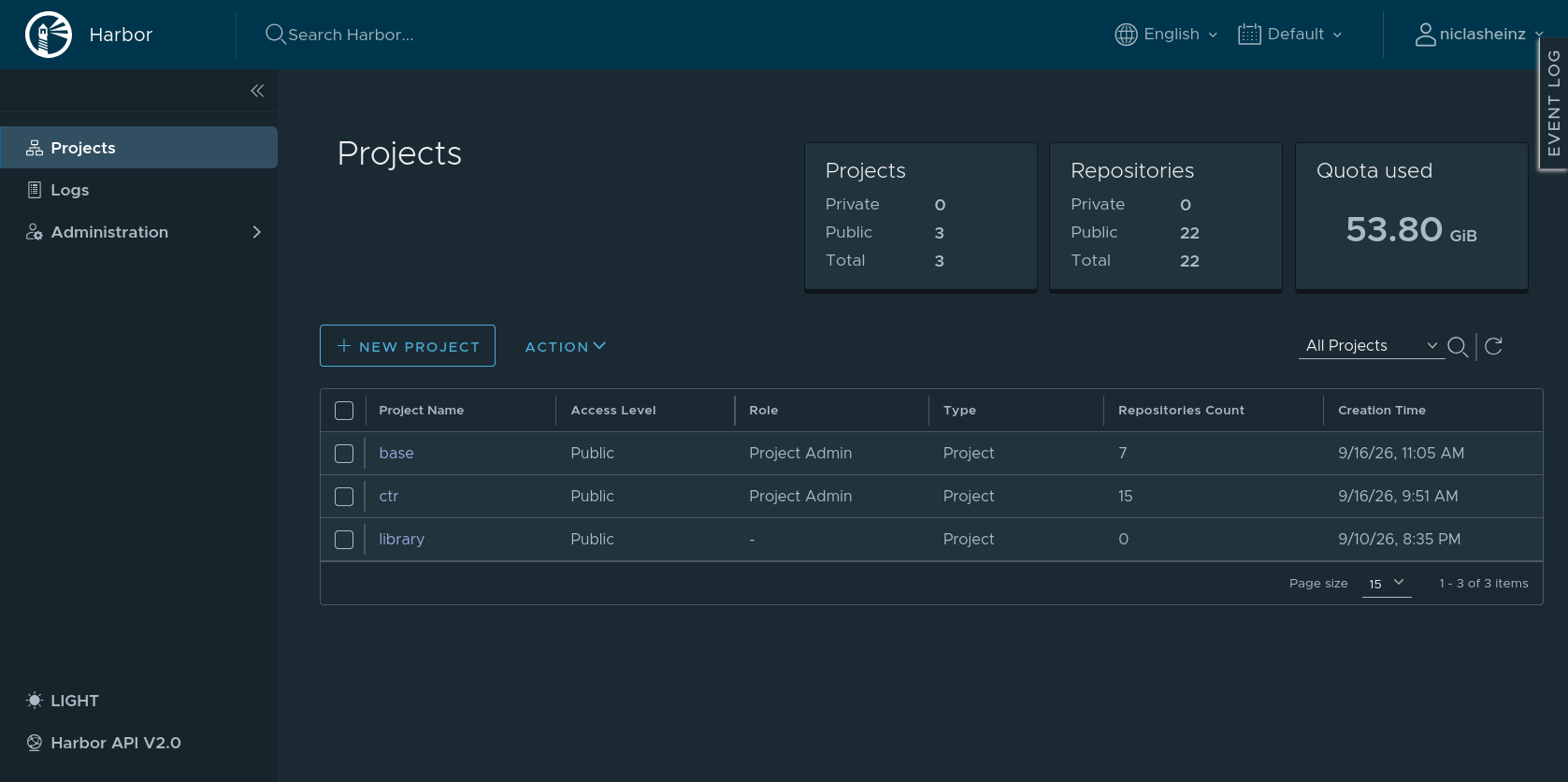
These are some of my base images:
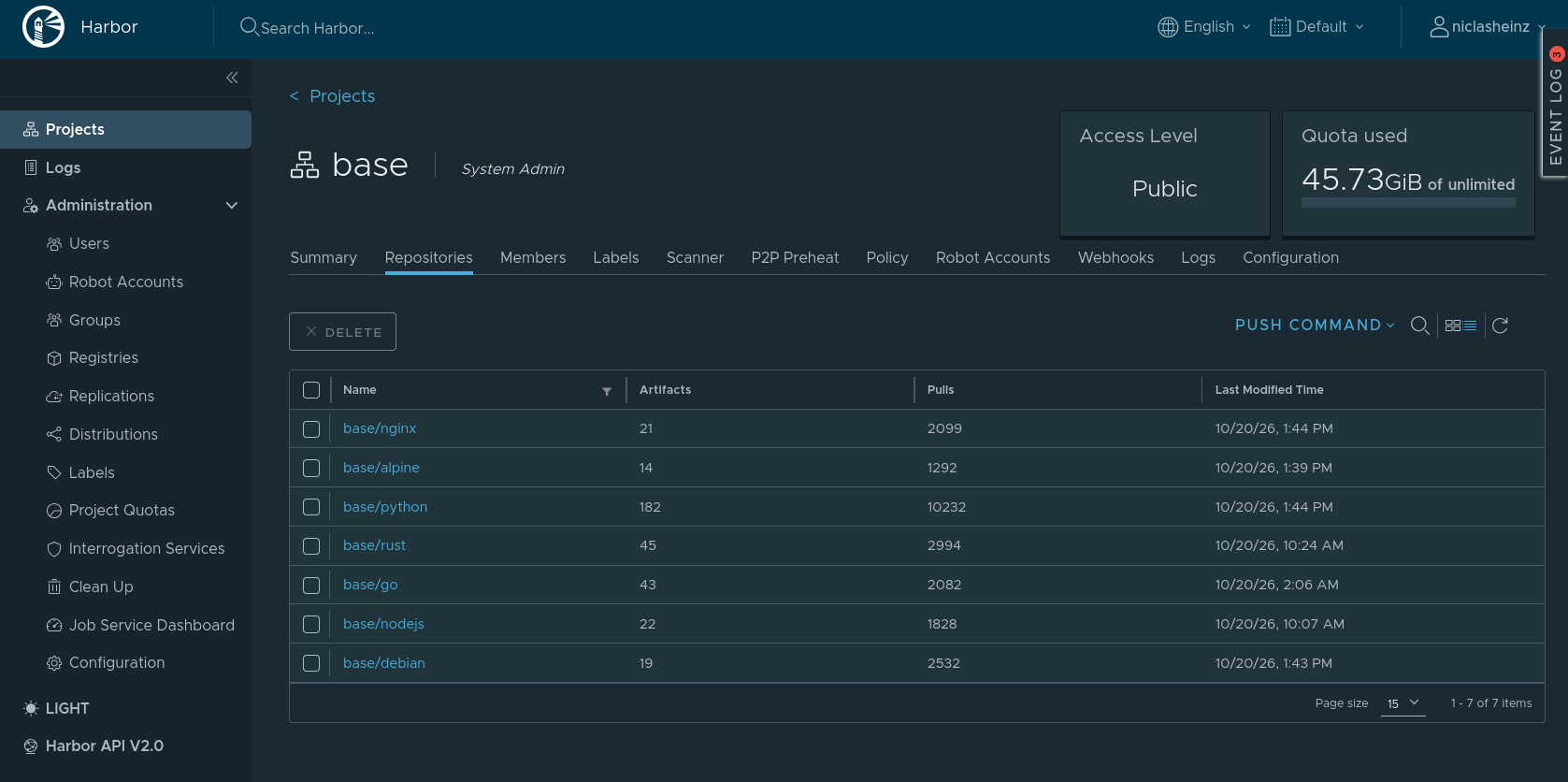
The images are rebuilt regularly, which is why repositories such as base/python contain many artifacts.
Pushing from Forgejo Actions pipelines
My Forgejo Actions workflows need to push images, but they should not be able to do more than that. For this I use a Harbor Robot Account with only the permissions required by the pipeline:
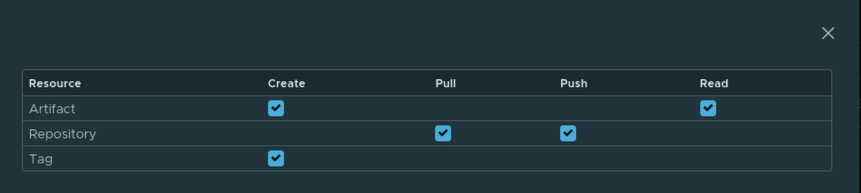
The account can create and read artifacts, pull and push to repositories and create tags. It cannot delete anything and has no administrative rights. If the token leaks from a CI job, the potential damage is limited.
Internal Kubernetes images in Harbor
For now, Harbor mostly holds the images that I build myself. The images that k3s and its components need to run, such as CoreDNS, Traefik or the metrics server, are still pulled directly from public registries. I plan to proxy these through Harbor as well. That way, all images needed for my infrastructure would live in one place, where they are scanned and tracked for vulnerabilities, and the cluster would not depend on Docker Hub or other public registries being reachable.
Housekeeping
Every rebuild creates new artifacts. Without cleanup, Harbor would grow indefinitely. It grew to 54 GiB, so I use Harbor retention policies to remove the artifacts without a tag referencing them.
Harbor can regularly rescan my images for newly discovered vulnerabilities. This is important because an image that was clean when I built it can become vulnerable later when a new CVE is published.
Harbor also generates Software Bills of Materials (SBOMs). These provide an inventory of the packages and components contained in an image. Together, the SBOM and the vulnerability scan help answer two separate questions:
- What is inside the image?
- Which known vulnerabilities affect those components?
During the build process in my Forgejo Actions pipelines, I also scan the images with Trivy. This means I scan them first before pushing to Harbor, and then again once the image is available on Harbor.
Harbor has a feature to block deployments when an image has critical vulnerabilities. I don't use this feature at the moment, for two reasons: 1. A vuln can be rated as critical but not be exploitable in my environment 2. I regularly scan images and my automated pipeline does the heavy-lifting with keeping the images up-to-date.
Don't get me wrong: I don't ignore critical vulnerabilities. It only means that I check them in the context of my infrastructure before I panic. And of course, public-facing services have a higher priority than services in my isolated homelab (see the classes above).
Renovate and dependency updates
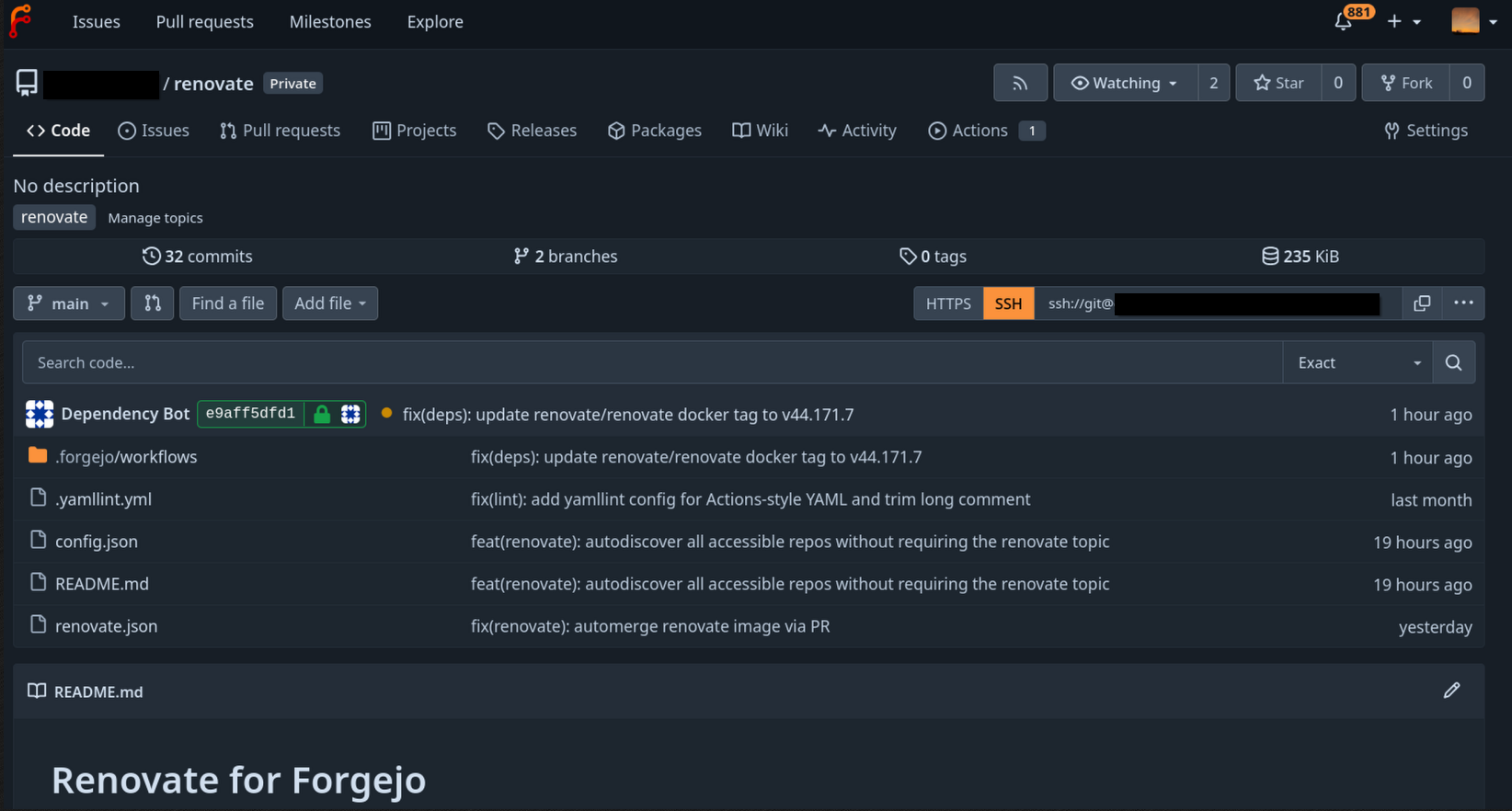
I use Renovate for keeping my dependencies up-to-date. It runs every four hours and creates PRs for updates to:
- container images
- Forgejo Actions
- Helm charts
- Ansible roles
- and any other dependency that Renovate supports
While I was on holiday and didn't have my notebook with me, I changed the Renovate configuration to automatically merge patch updates after a five-hour delay. The delay is intentional: Earlier this year there were many supply chain attacks, and in most cases the affected packages were detected and removed within the first 2 hours.
Automatically merged updates are rolled out without me watching. That means I review the changes on weekdays: I check whether everything worked as expected, meaning that Flux reconciled without errors and the updated applications are still running correctly. If something is wrong, I roll back through Git.
Git workflow and linting
Every change starts in a separate branch and goes through a pull request. When the pull request is opened, Forgejo Actions run the first checks:
- hadolint: checks if the Containerfile follows best practices
- Gitleaks: checks for hard-coded secrets within git
- Trivy: scans for secrets and vulnerabilities within containers
- rumdl and yamllint: for linting Markdown and YAML files
- the container is built to make sure the changes actually work
Only when the pipeline has run without errors is the branch merged into main. The merge triggers a second pipeline, which builds the image again, scans it with Trivy and pushes it to Harbor.
flowchart LR
    Branch["Create feature branch"] --> PR["Open pull request"]
    PR --> Lint["Lint: hadolint, rumdl, yamllint"]
    Lint --> Secrets["Gitleaks"]
    Secrets --> TestBuild["Test build"]
    TestBuild --> PRScan["Scan with Trivy"]
    PRScan -->|Pipeline green| Merge["Merge into main"]
    PRScan -->|Pipeline failed| Fix["Fix in branch"]
    Fix --> PR
    Merge --> Build["Build image"]
    Build --> Scan["Scan with Trivy"]
    Scan --> Push["Push to Harbor"]
Deployment with Flux to Kubernetes
Images are deployed through a Flux repository. Once a change is made on the main branch, Flux reconciles the configuration and rolls out the new image.
The deployment workflow looks like this:
flowchart LR
    Image["Image pushed to Harbor"] --> Update["Update image tag and digest"]
    Update --> Lint["Lint Flux repository"]
    Lint --> Main["Merge change into main"]
    Main --> Reconcile["Flux reconciles repository"]
    Reconcile --> Rollout["Kubernetes rolls out image"]
    Rollout --> Checks["Check application and logs"]
    Checks -->|Problem| Rollback["Roll back through Git"]
I use both a human-readable tag and an image digest. The tag makes it easier to understand which application version is deployed, while the digest identifies the exact immutable image that was pulled from Harbor.
After every new update and rollout I manually verify if the applications are working as expected. I don't have automated application checks.
Secrets and permissions
When I need to save SSH keys, API tokens or registry credentials in Forgejo I use Forgejo Secrets for that. My main Forgejo instance is only reachable from a small number of trusted networks and through my VPN, so I accept the risk that comes with it: If someone gets admin-level access to the Forgejo instance, they could exfiltrate those credentials.
The Forgejo Runner uses Docker-in-Docker for building OCI images. Gitleaks is also a part of my pipeline to detect accidentally committed secrets in my repos.
Limitations and trade-offs
There are some trade-offs with building my own images. One of them is that I can't have the same scale of testing as large upstream projects with thousands of daily users. A community-maintained image like Nextcloud's docker container is built, tested and used by many people across all kinds of environments. My images are primarily used by me, so if I accidentally misconfigure something and break the container, I'm the only one affected.
To make up for this, I compare my images with the official upstream builds from time to time. I check the upstream Containerfiles and release notes, for example of the official Nextcloud and PHP images, and decide whether I should adopt changes such as new build options, extensions or hardening steps.
I also don't have an automated way to decide whether a vulnerability can be exploited in my environment or not. So there is a manual step needed.
Another thing is that I rely mostly on Trivy and its database to secure my images. If Trivy doesn't find specific vulnerabilities or hard-coded secrets I would be at risk. Unknown vulnerabilities, application bugs, configuration mistakes and compromised build dependencies are still possible but the risk is way lower with this setup.
This trade-off is acceptable. It comes with additional maintenance work, but with higher flexibility which allows me to react faster to some incidents.
Incident: PHP2SHELL vulnerability
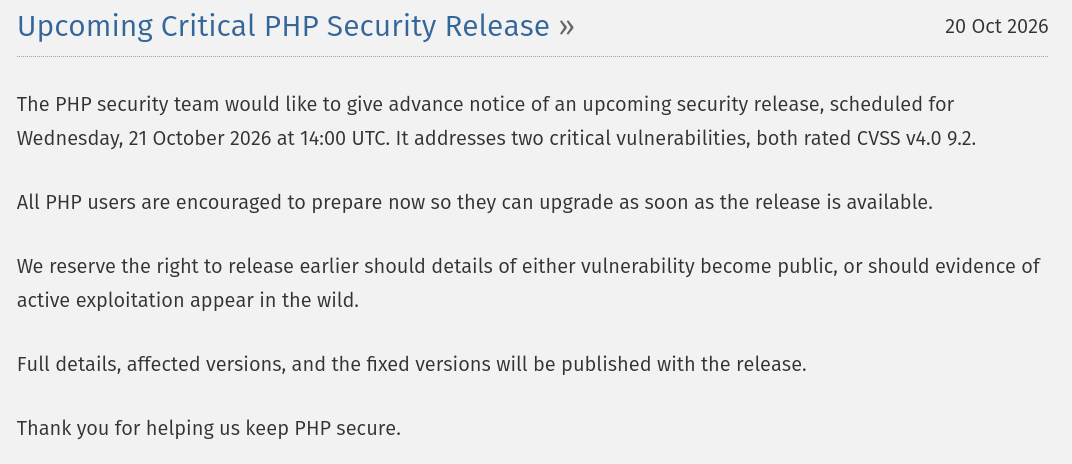
On Wednesday, 21 October 2026, PHP published a critical security release. A day earlier, the PHP security team had announced it in advance and encouraged all PHP users to prepare for the upgrade.
 source php.net
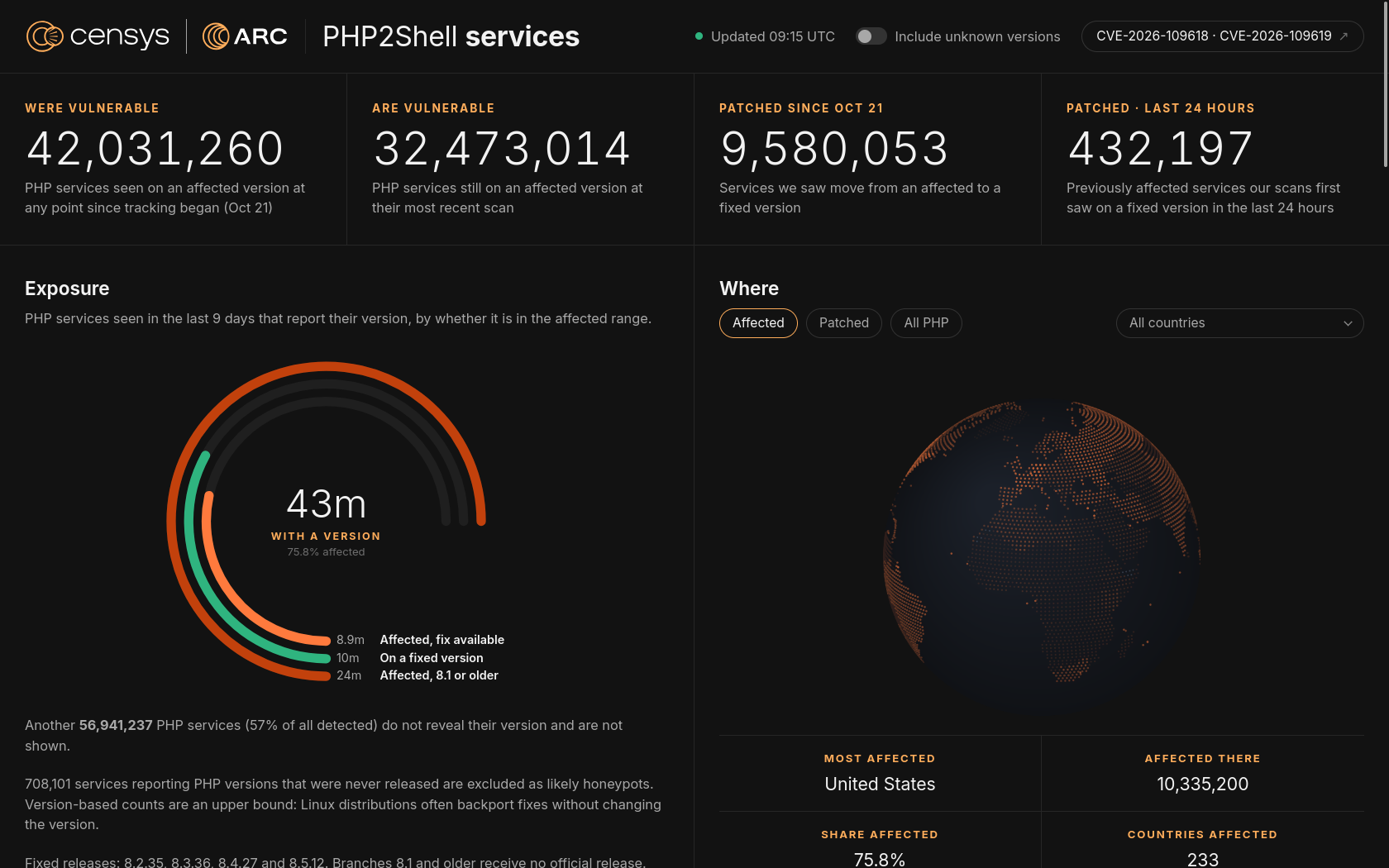
PHP2SHELL received a lot of attention on the internet. I rarely see that many posts about a vulnerability on social media and in community chats.
 (source: https://php2shell.censys.com/)
This is how the day went (all times UTC):
| Time | Event |
|---|---|
| 14:00 | Release scheduled by the PHP security team |
| ~13:35 | PHP releases 8.5.12, 8.4.27, 8.3.36 and 8.2.35 |
| 13:45 | Both advisories are published |
| ~13:50 | Fixed php8.4 (8.4.27-1~deb13u1) appears in the Debian 13 (Trixie) security archive |
| 15:38 | Debian 12 fix announced (DLA-4848-1), not yet installable |
| 16:13 | Debian 12 fixed |
Times are taken from ma.ttias.be.
Here is how I reacted, step by step:
1. Identify affected services
One of the affected systems was my Nextcloud instance which runs on PHP. Luckily, I could quickly identify which other services are running or having components that run on PHP. I prioritized systems that were reachable from the internet (class 1, see the classes above).
2. Reduce exposure
Up until 14:00 UTC I had to wait for the announcement. I used the time to move my public-facing services behind my VPN to reduce the attack surface, and kept them there until my systems were patched. My homelab was a lower priority (class 3), because it is not directly exposed to the internet.
3. Wait for the distribution patch
As most of my servers and container images are based on Debian, I had to wait for a patched package version to get published. During the wait time, there were a lot of supposed mitigations. Since I couldn't verify whether these would actually be helpful, I waited for the announcement from the PHP Security Team.
As soon as the patch was available in the Trixie repository, I manually started the rebuild of the Debian base image.
4. Rebuild the image chain
After the first rebuild of the Debian image, the next step was to update the PHP base image and after that the affected application image that got built through Forgejo Actions. The images were scanned with Trivy and then pushed to Harbor.
The whole building process took around 15 minutes after the patched package became available. That is fast, partly because I only need to support ARM and AMD64 and not all the other architectures that official images like Nextcloud AIO or the PHP image on Docker Hub are built for.
The incident workflow looked like this:
flowchart TD
    Alert["PHP vulnerability becomes known"] --> Identify["Identify affected services"]
    Identify --> Restrict["Restrict public-facing services (VPN only access)"]
    Restrict --> Wait["Wait for Debian patch"]
    Wait --> Rebuild["Rebuild Debian base image"]
    Rebuild --> Chain["Rebuild PHP and application images"]
    Chain --> Scan["Test and scan images"]
    Scan --> Push["Push to Harbor"]
    Push --> Rollout["Roll out through Flux"]
    Rollout --> Verify["Verify digest, logs and application"]
5. Deploy and verify
As soon as the new images were pushed and available in Harbor, I changed the SHA digests of the deployment configuration in my Flux repository. Flux detected those changes in the main branch and rolled out the new image to Kubernetes.
I then connected to my Kubernetes cluster and verified that the new image with the changed digest actually runs. I also checked logs and health checks if problems occurred during rollout.
Conclusion
The PHP incident showed me that my system is worth it. I was quickly able to identify the affected services, reduce their exposure and, after waiting for the Debian patch, rebuild the complete image chain within minutes.
For me, the most important benefits are:
- knowing what is inside my images
- supporting both AMD64 and ARM64
- having reproducible and reviewable changes
- knowing what changed under the hood in an image
- detecting vulnerabilities in CI and in Harbor
- limiting the permissions of build credentials
- being able to react quickly during a security incident
Comments
Reply on this Mastodon post to join the discussion.